Showing posts with label Visual Studio. Show all posts

Monday, October 10, 2016

VB.NET Example Code to backup MySQL Database using mysqldump command in VB using Visual Studio 2015

In this post, we will see how to create a simple VB.NET application to backup MySQL database using the same mysqldump command by firing command prompt from the VB application. For this example, I am using Visual Studio 2015 Community edition.

In some examples on the internet, you would also find the use of mysql connectors for Visual Studio. I have also used it and it works. But since in this post, I am directly going to fire the command prompt from the VB application just like we execute mysqldump command directly in command prompt, there is no need to use the mysql connector for backup purposes. It will however be required if your application is going to fetch data display data etc from a MySQL database in the VB application.

The form designed is:
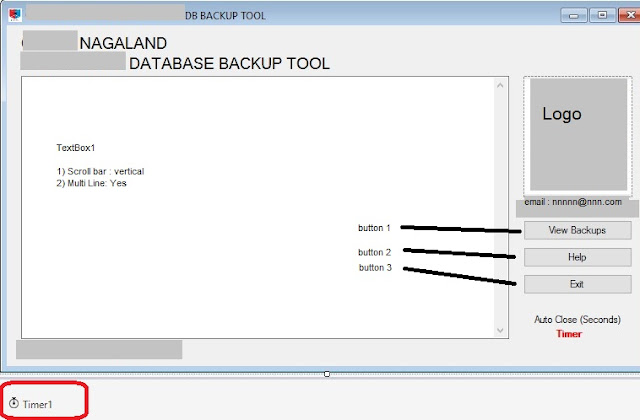
VB.NET Example Code: How to backup MySQL Database using mysqldump command in VB?

Ignoring the other labels, the important form elements used in code are:
Read more �
Share:

Wednesday, May 18, 2016

[Resolved] Visual Studio Connect to Microsoft SQL Server Database Failed - A network-related or instance-specific error occurred

Visual Studio Tools Connect to Database
Issue: Visual Studio Connect to Microsoft SQL Server Database Failed - A network-related or instance-specific error occurred
Error Message:
A network-related or instance-specific error occurred while establishing a connection to SQL Server.
The server was not found or was not accessible. Verify that the instance name is correct and that SQL Server is configured to allow remote connections.
(provider: Named Pipes Provider, error: 40 - Could not open a connection to SQL Server) (Microsoft SQL Server, Error: 1326)
Description: When attempting to connect to a database from Visual Studio, if you are getting a message from Visual Studio Data Connection that it was not able to connect to SQL Server, check the following workaround.

Read more �
Share:

Thursday, February 18, 2016

[Workaround] Unable to install Visual Studio in Windows 8.1: Access Denied

This post is a troubleshooting done on the issue of Visual Studio installation on Windows (Windows 8.1 in this case). Error Encountered: 0x80070005 - Access Denied

Visual Studio Express setup log shows:
"Error 0x80070005: Failed to write run key value.
Error 0x80070005: Failed to update resume mode.
Error 0x80070005: Failed to begin registration session.
Error 0x80070005: Failed to begin registration session in per-machine process.
Error 0x80070005: Failed to register bundle."
Workaround:
Read more �
Share:

Wednesday, February 17, 2016

[Solved]: Unable to uninstall Visual Studio Express 2012 from Windows computer

Issue: Unable to uninstall Visual Studio Express 2012 from Windows computer

Microsoft Visual Studio Express 2012 installation did not get installed due to Access Denied error. But Visual Studio Express 2012 is found in the list of Programs in Control Panel > Uninstall a Program. As it is not installed properly, the Visual Studio Program is cannot be run.

Attempts to uninstall the program but still getting "Access Denied error".

Visual Studio Express setup log shows:
"Error 0x80070005: Failed to write run key value.
Error 0x80070005: Failed to update resume mode.
Error 0x80070005: Failed to begin registration session.
Error 0x80070005: Failed to begin registration session in per-machine process.
Error 0x80070005: Failed to register bundle."
Solution:
Read more �
Share: